See How Microsoft 365 Copilot Can Help Your Business
Small and midsize businesses are always looking for ways to improve productivity and get more done with the resources they have. Employees often manage busy schedules, large amounts of information, and many tasks at the same time.
Microsoft 365 Copilot can help businesses work more efficiently by bringing AI-powered assistance into familiar Microsoft 365 applications. From creating content to summarizing information, Copilot can help employees save time and focus on higher-value work.
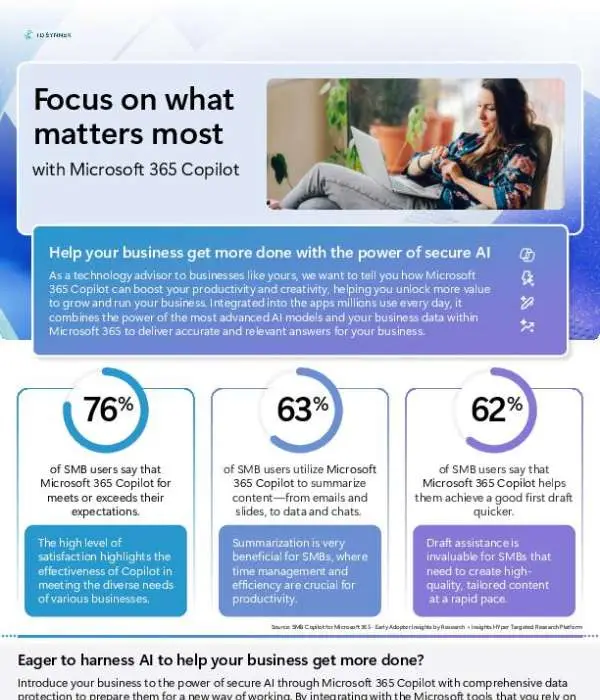
The featured infographic highlights key adoption statistics and real-world benefits that show how small and midsize businesses are using Copilot to improve the way they work.
Improve Everyday Productivity
Employees spend a large part of their day handling routine tasks. Reading emails, reviewing documents, preparing notes, and organizing information can all take valuable time.
Copilot can help simplify many of these activities. By using AI to assist with common tasks, employees can spend less time on repetitive work and more time focusing on projects, customers, and business priorities.
Even small improvements can make a meaningful difference. When employees can complete routine tasks faster, the entire organization can benefit.
Make Summarization Easier
Modern businesses deal with a constant flow of information. Employees may need to review long documents, email conversations, meeting notes, and other business content.
Finding the most important information can take time.
Microsoft 365 Copilot can help employees summarize information and identify key points. This can make it easier to understand important details without having to manually review every piece of content.
For busy teams, faster access to useful information can support better productivity and decision-making.
Support Content Creation
Creating business content is another area where AI can provide valuable support. Employees may need to write emails, reports, presentations, proposals, or other documents throughout the day.
Copilot can help employees get started by generating ideas and creating draft content. It can also help refine existing content and make it easier to turn information into polished business materials.
Human creativity and judgment remain important. Copilot simply provides another tool to help employees move from an idea to a finished piece of content more efficiently.
Simplify Project Management
Managing projects requires organization and communication. Teams need to keep track of tasks, deadlines, meetings, updates, and important information.
Copilot can help employees organize and work with this information more efficiently. AI-powered assistance can make it easier to summarize project details, identify important information, and keep teams focused on their priorities.
This can help reduce the time employees spend managing information and give them more time to move projects forward.
Empower Small and Midsize Businesses
Large organizations are not the only businesses that can benefit from AI. Small and midsize businesses can also use AI to improve everyday operations and help employees work more effectively.
Copilot can provide assistance across a variety of business functions. This gives SMBs an opportunity to introduce AI into existing workflows without completely changing the tools employees already use.
As AI becomes a larger part of the workplace, adopting the right technology can help businesses remain competitive and prepared for future opportunities.
See Why SMBs Are Using Copilot
The featured infographic provides a quick look at Microsoft 365 Copilot adoption statistics and real-world business benefits. It highlights how businesses are using Copilot to support tasks such as summarization, content creation, project management, and more.
View the infographic to see why SMBs are turning to Microsoft 365 Copilot to improve productivity, creativity, and operational efficiency.
If your business is ready to explore AI, contact Tech Hero. Our team can help you understand what Microsoft 365 Copilot can do for your organization and identify practical ways to bring AI-powered productivity tools into your everyday workflows.