
Data security for today’s dynamic work environment
Microsoft Purview Adaptive Protection: AI-Driven Data Security for a Dynamic Workplace
In today’s digital workplace, sensitive information is constantly moving across email, cloud storage, collaboration platforms, endpoints, and mobile devices. Employees routinely share documents through platforms like Microsoft Teams, SharePoint, OneDrive, and Exchange Online while also accessing business data from remote locations and personal devices. While this flexibility increases productivity, it also makes it significantly more difficult for security teams to identify, monitor, and protect sensitive data without disrupting legitimate business activities.
Traditional Data Loss Prevention (DLP) solutions often rely on static, one-size-fits-all policies. These policies typically apply the same restrictions to every user regardless of their role, behavior, or level of risk. As a result, organizations often experience two common problems:
- Too many false positives, where legitimate business activities are unnecessarily blocked, frustrating users and increasing help desk requests.
- Insufficient protection, where sophisticated insider threats or compromised accounts evade generic security policies because they don’t trigger predefined rules.
Microsoft Purview Adaptive Protection addresses these challenges by combining artificial intelligence (AI), machine learning, and risk-based security policies to provide a more intelligent approach to protecting sensitive information. Rather than treating every user and every activity the same, Adaptive Protection continuously evaluates user behavior and dynamically adjusts data protection controls based on real-time risk.
How Adaptive Protection Works
Adaptive Protection integrates several Microsoft security technologies to create a comprehensive view of user risk. It leverages signals from Microsoft Purview Insider Risk Management, Microsoft Entra ID, Microsoft Defender, and Microsoft 365 services to evaluate activities such as:
- Unusual file downloads or uploads
- Excessive copying of sensitive data
- Attempts to move confidential information to personal cloud storage
- Printing or emailing sensitive documents outside the organization
- Access from unfamiliar devices or locations
- Suspicious user behavior that deviates from established patterns
AI analyzes these behavioral signals to determine whether a user’s activity represents normal business operations or an elevated risk that warrants additional protection.
Dynamic Data Loss Prevention
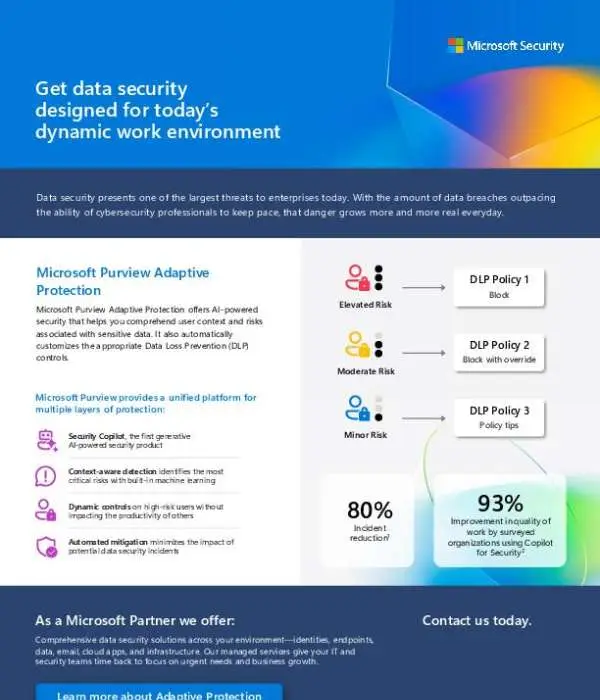
Unlike traditional DLP policies that apply the same restrictions to everyone, Adaptive Protection enables organizations to automatically adjust security controls based on a user’s current risk level.
For example:
- Low-risk users can continue working with minimal interruptions, allowing normal collaboration and file sharing.
- Medium-risk users may receive policy tips, warnings, or requests for business justification before sharing sensitive information.
- High-risk users can be automatically prevented from downloading, copying, printing, or transferring sensitive files until the potential risk has been investigated.
This adaptive approach improves security without unnecessarily impacting employee productivity.
Reducing Insider Risk
Insider threats remain one of the most difficult security challenges because they often involve legitimate user credentials and authorized access. Adaptive Protection helps organizations detect risky behaviors before they lead to data loss by identifying patterns such as:
- Employees preparing to leave the company who begin downloading unusually large volumes of confidential files.
- Compromised accounts attempting to exfiltrate sensitive customer or financial information.
- Users repeatedly bypassing security warnings or violating data handling policies.
- Unusual access to intellectual property, source code, or regulated data.
By identifying these behaviors early, organizations can intervene before sensitive information leaves their environment.
Seamless Integration Across Microsoft 365
Adaptive Protection works natively across the Microsoft ecosystem, including:
- Microsoft Teams
- SharePoint Online
- OneDrive for Business
- Exchange Online
- Microsoft 365 Apps
- Windows endpoints
- Microsoft Defender
- Microsoft Entra ID
- Microsoft Purview Data Loss Prevention
- Microsoft Purview Insider Risk Management
Because these services share intelligence, organizations gain a unified security experience without deploying multiple disconnected solutions.
Benefits for Security Teams
Microsoft Purview Adaptive Protection helps organizations:
- Reduce accidental and intentional data loss.
- Apply security controls based on real-time user risk instead of static policies.
- Minimize false positives and unnecessary user disruptions.
- Improve visibility into insider risk activities.
- Automate policy enforcement using AI-driven insights.
- Protect sensitive data across cloud services, endpoints, email, and collaboration tools.
- Strengthen compliance with industry regulations by ensuring appropriate safeguards are consistently applied.
Enabling Secure Productivity
One of the key advantages of Adaptive Protection is its ability to balance security with user experience. Rather than restricting every employee equally, it focuses stronger protections only where elevated risk exists. This allows trusted users to collaborate efficiently while ensuring higher-risk activities receive additional scrutiny.
Conclusion
As organizations continue to embrace hybrid work and cloud-based collaboration, protecting sensitive information requires more than static security policies. Microsoft Purview Adaptive Protection uses AI, behavioral analytics, and real-time risk assessment to continuously evaluate user activity and automatically apply the appropriate Data Loss Prevention controls. By adapting security to each user’s level of risk, organizations can better protect their most valuable data, reduce insider threats, simplify compliance, and enable employees to work securely without unnecessary interruptions.
. Download the brief to see how it protects sensitive data without slowing work down.
View: Get data security designed for today’s dynamic work environment