
Why Cloud Server Security Should Be Your Business’s Top Priority
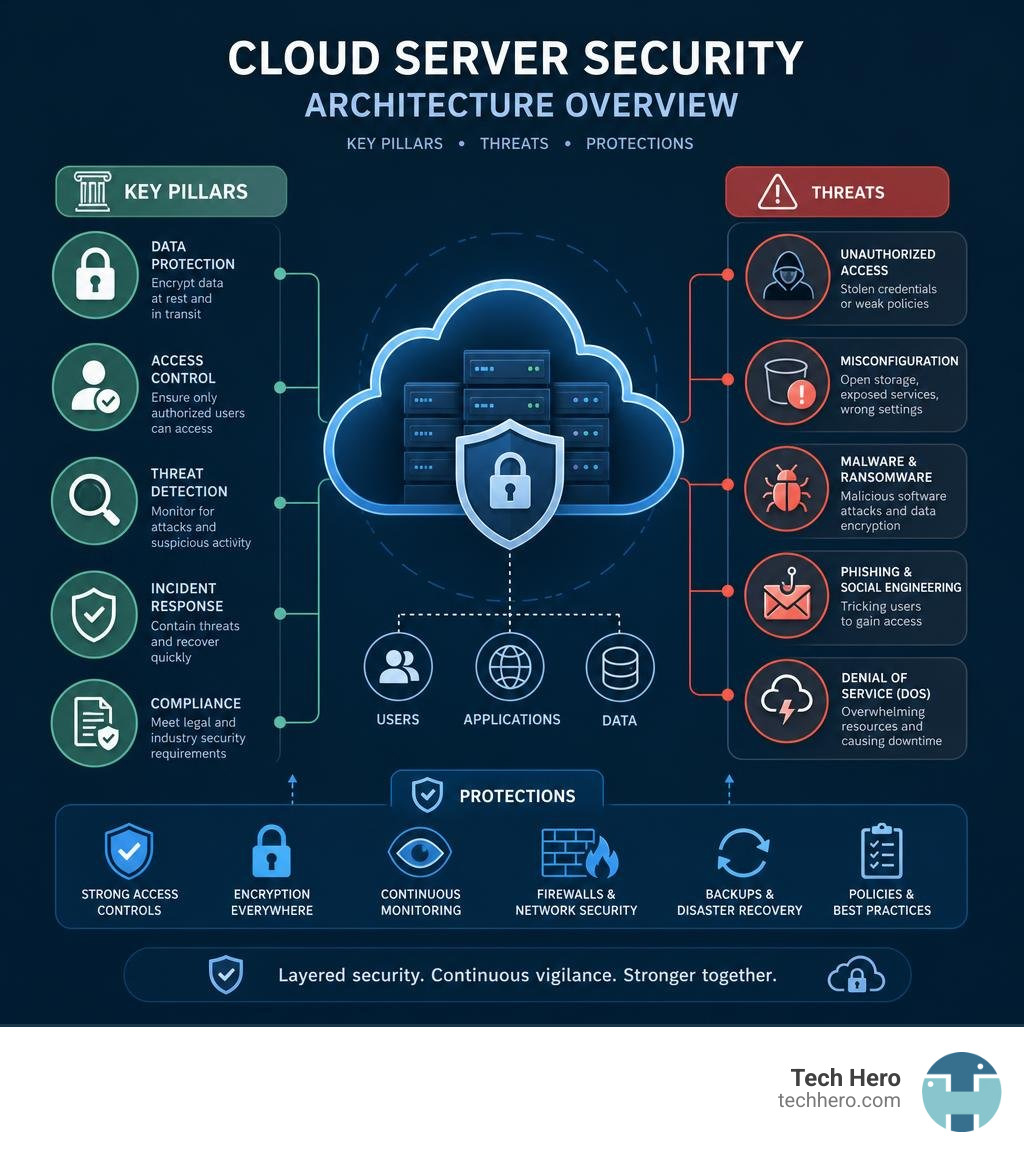
Cloud server security is the set of tools, policies, and practices that protect your data, applications, and infrastructure when they live in the cloud — and for most small businesses today, it’s one of the most important things you can get right.
Here’s a quick answer if that’s all you need:
Cloud server security covers:
- Data protection — encrypting information both at rest and while it moves between systems
- Access control — making sure only the right people can reach your data
- Threat detection — monitoring for attacks, misconfigurations, and suspicious activity
- Incident response — having a plan to contain and recover from a breach
- Compliance — meeting legal requirements like HIPAA or GDPR for how data is stored and handled
The cloud has made it easier than ever for small businesses to run powerful, flexible IT systems without owning a server room. But that convenience comes with real risk.
Security threats are increasingly aimed directly at cloud environments — largely because many organizations don’t have full visibility into who is accessing their data or where it’s going. And a surprising share of cloud breaches don’t come from sophisticated hackers. They come from simple mistakes: a misconfigured storage bucket, a default password left unchanged, or a shared account with too many permissions.
The good news? Most of these risks are preventable with the right setup and the right partner watching your back.
Demystifying Cloud Security in Digital Transformation
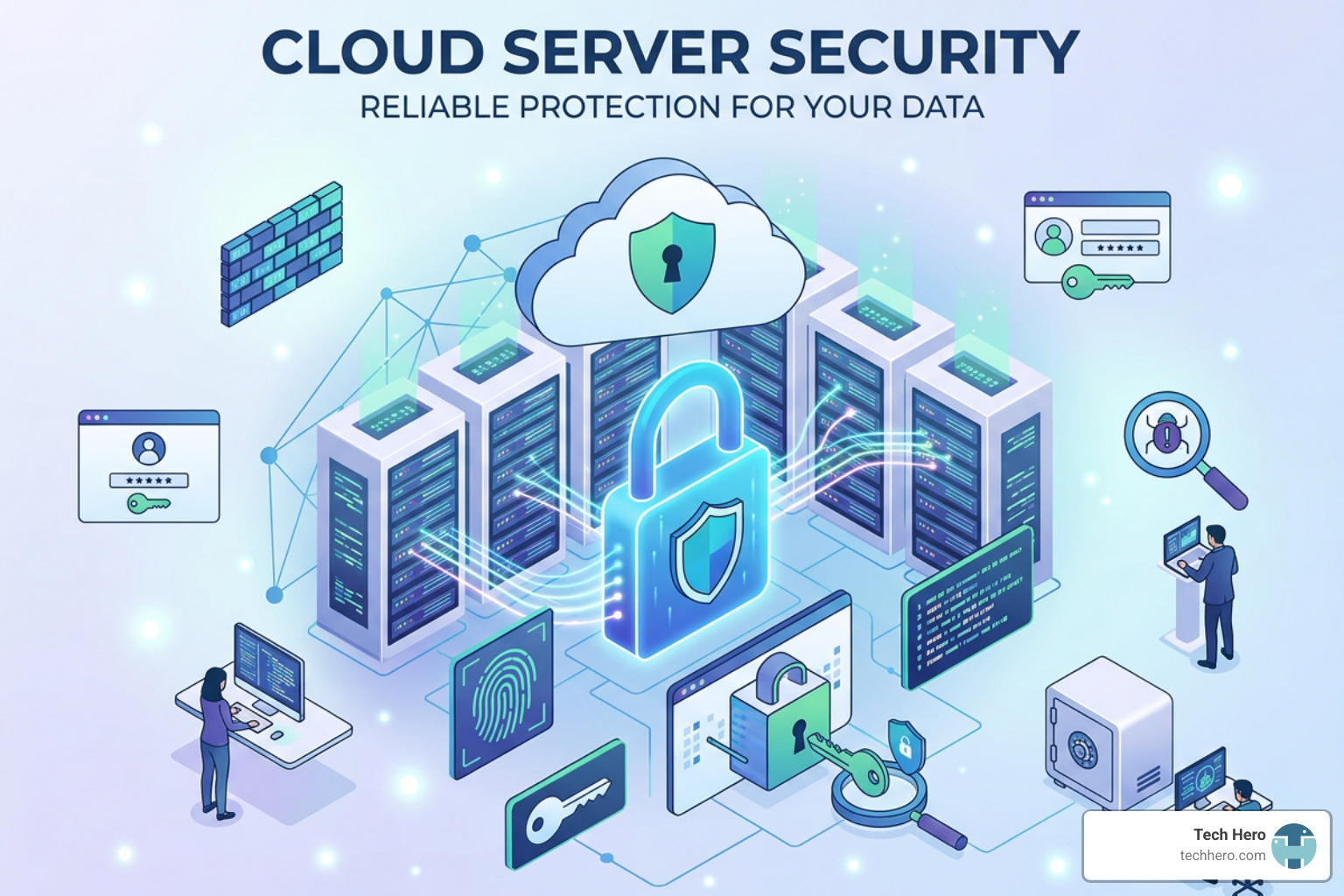
Digital transformation has fundamentally reshaped how modern businesses operate. We no longer anchor our business tools to a dusty server rack sitting in a back office closet. Instead, workloads, databases, and software applications live in distributed cloud environments.
However, migrating to the cloud doesn’t automatically make your business immune to cyber threats. While third-party cloud providers offer world-class physical data center security, protecting your actual digital assets remains your responsibility. At Tech Hero, we help businesses maintain rock-solid cloud server security without sacrificing the operational speed and flexibility that made them choose the cloud in the first place.
Understanding how to secure your digital footprint starts with mastering attack surface management and ensuring operational business continuity. If you want to dive deeper into regulatory readiness during your transition, check out our guide on Navigating Cloud Compliance.
Core Pillars of Cloud Infrastructure Protection
To keep your workloads safe, you need to look at cloud infrastructure protection across four foundational pillars:
- Data Movement Transparency: Tracking how data flows into, within, and out of your virtual network edges.
- Multitenancy Risk Management: Ensuring your cloud workloads are logically isolated from other organizations sharing the same physical hardware servers.
- Closing Visibility Gaps: Eliminating blind spots across multi-cloud setups, remote devices, and connected software.
- Cloud Workload Protection: Safeguarding individual virtual machines, containers, and serverless applications against exploit attempts.
When you manage these pillars proactively, your cloud infrastructure becomes an engine for safe innovation rather than an unpredictable security headache.
The Shared Responsibility Model Explained
One of the biggest misconceptions in modern IT is assuming that moving to the cloud offloads 100% of your security duties to your vendor. In reality, every major provider operates under the Shared Responsibility Model.
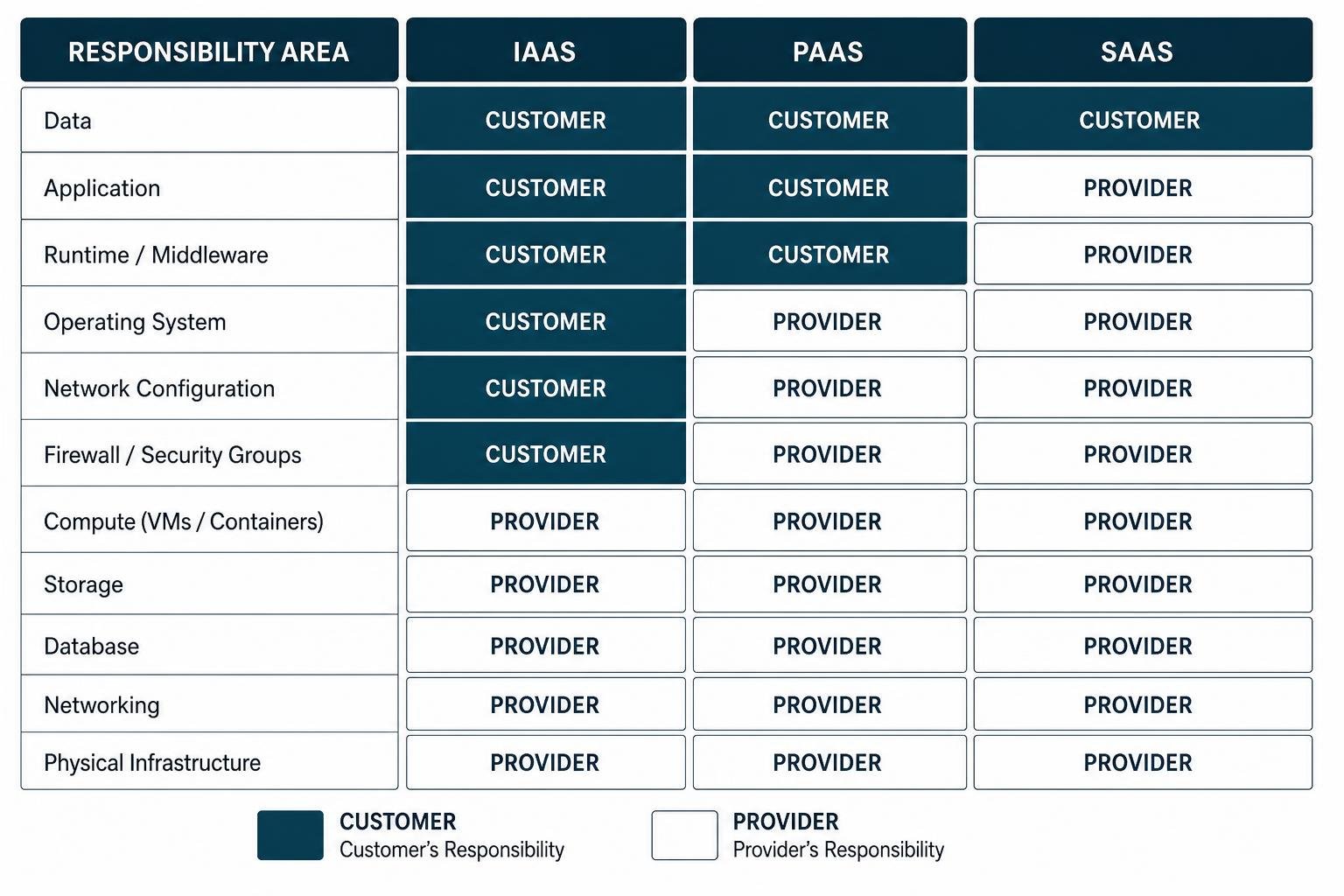
Under this framework, responsibilities are split:
- Security OF the Cloud (Provider’s Job): The provider safeguards the physical facilities, power, cooling, host hardware, underlying storage devices, hypervisors, and global network infrastructure.
- Security IN the Cloud (Customer’s Job): You are responsible for guest operating system patching, firewall rules, user access controls, client-side data encryption, network configurations, and application code.
The exact boundary shifts depending on whether you choose Infrastructure as a Service (IaaS), Platform as a Service (PaaS), or Software as a Service (SaaS). For instance, in an IaaS virtual server deployment, operating system patches and firewall settings fall squarely on your shoulders. Modern industry standards like the Security Pillar – AWS Well-Architected Framework emphasize that mastering this boundary is step one toward building trust in the cloud.
Cloud Server Security vs. On-Premise Infrastructure
Comparing cloud server security to traditional on-premise security isn’t about deciding which one is universally “better.” It’s about understanding how their operational models, cost structures, and technical requirements differ so you can make the right decision for your team.
| Security Dimension | On-Premise Infrastructure | Cloud Server Security |
|---|---|---|
| Capital Expenses (CapEx) | High upfront investment in servers, switches, and physical space | Minimal upfront cost; shifts to predictable subscription OpEx |
| Operational Flexibility | Restricted by physical server hardware and physical site capacity | Instant scale up or scale down on demand |
| Physical Access Control | Total direct control over server rooms, locks, and local access | Managed by cloud vendor inside world-class, certified facilities |
| Patch Management | Manual hardware maintenance and manual firmware updates | Automated software updates and continuous cloud patching |
| Scalability & Storage | Finite capacity; hardware upgrades require long purchasing cycles | Infinite storage capacity scaled dynamically through cloud tiers |
Businesses wondering how to shift away from legacy hardware often discover immediate agility gains. To see how small and mid-sized businesses maximize these advantages, read Why SMBs Should Securely Migrate to Azure.
Infrastructure Management and Disaster Recovery
Maintaining physical, on-premise servers requires constant hands-on care—replacing failing hard drives, managing UPS battery backups, cooling hardware, and managing manual tape or drive backups. If a physical disaster like a flood, fire, or prolonged power failure strikes your office building, on-premise hardware can suffer permanent data loss and extended downtime.
Cloud server security transforms disaster recovery. Because cloud data lives off-site across redundant data center clusters, an incident at your physical office won’t take down your operations. Cloud platforms utilize automated failover mechanism routines, redundant hardware clusters, and over-the-air software updates to keep systems updated and running smoothly. However, you should still maintain hybrid, offline backups to protect against ransomware that targets cloud-synced files.
Key Considerations for Security System Selection
When evaluating cloud versus on-premise systems, weigh these strategic factors:
- Network Bandwidth & Latency: Ensure your local internet connections can handle real-time data transfers without bottlenecks.
- Regulatory Constraints & Data Residency: Industry regulations may dictate whether client data can reside in multi-tenant environments or specific geographical regions.
- Total Cost of Ownership (TCO): Weigh the ongoing maintenance, hardware replacement, and cooling costs of on-premise gear against recurring cloud subscription costs.
Key Vulnerabilities and Challenges in Cloud Environments

While cloud infrastructure is inherently resilient, the dynamic nature of cloud environments introduces distinct security risks. Advanced security threats explicitly target cloud providers because many organizations lack complete visibility into data access patterns and user activity.
If you are currently evaluating risk exposure across dynamic environments, explore our guide on Balancing Agility and Risk Across Private and Hybrid Cloud.
Mitigating Cloud Asset Misconfigurations
A substantial portion of breached cloud records stems directly from misconfigured assets. Inadvertent insiders—well-meaning employees or overloaded IT staff—frequently leave doors unlocked by accident.
Common cloud misconfigurations include:
- Unrestricted public access on cloud storage buckets (such as open AWS S3 storage buckets).
- Keeping default administrative passwords intact on virtual server instances.
- Unused, open server management ports (like SSH port 22 or RDP port 3389) exposed directly to the public internet.
- Oversubscribed access permissions that violate the principle of least privilege.
To combat misconfigurations, organizations deploy Cloud Security Posture Management (CSPM) tools. CSPM continuously monitors your cloud environment, detects configuration drift from baseline rules, and automatically fixes unauthorized changes before malicious actors exploit them.
Overcoming Visibility Gaps and Shadow IT
Shadow IT occurs when employees use unauthorized SaaS applications or spin up unsanctioned cloud servers without IT oversight. While this might boost short-term employee convenience, it creates huge blind spots for your security team. You can’t protect data you don’t know exists.
To reclaim control over shadow IT and eliminate visibility gaps, modern IT environments rely on centralized log aggregation and endpoint controls. Integrating central analytics platforms like the Microsoft Sentinel Cloud SIEM Solution allows security teams to aggregate logs, analyze cross-platform activity, and catch abnormal data movements in real time.
Core Best Practices for Cloud Infrastructure Defense
Building a resilient cloud server security posture requires a layered, defense-in-depth approach. Rather than relying on a single security perimeter, you must enforce strict verification controls across every layer of your IT architecture.
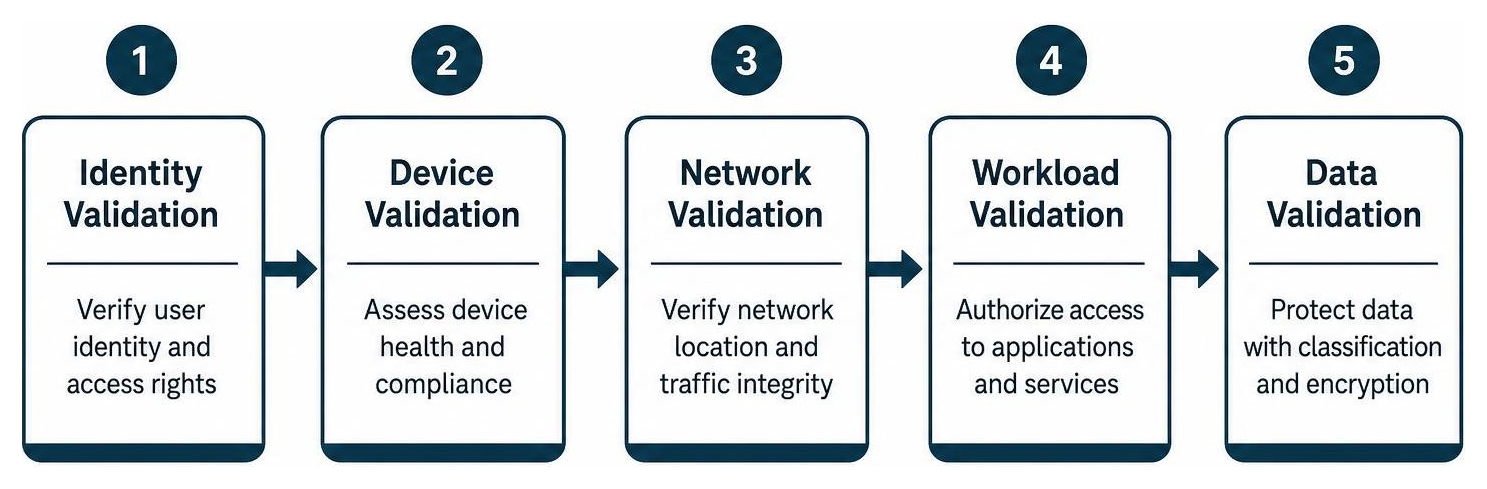
A foundational framework for modern cloud defense is Zero Trust Architecture. Under Zero Trust, the core principle is simple: never trust, always verify. Every access request—whether originating from inside or outside your corporate network—must be authenticated, authorized, and fully encrypted before access is granted.
Frameworks like the Nutanix Cloud Platform v6.8 Security Target show how strict security target requirements and virtual disk isolation policies enforce baseline security across cloud platforms.
Identity Management Best Practices for Cloud Server Security
Identity is the new perimeter in cloud computing. Securing digital identities prevents credential theft from turning into a devastating company-wide breach.
Key Identity and Access Management (IAM) strategies include:
- Enforce Multi-Factor Authentication (MFA): Require MFA across all accounts—especially administrative roles—to block automated password attacks.
- Apply Role-Based Access Control (RBAC): Group permissions by business role so employees only access the specific assets required for their job duties.
- Use Temporary Credentials: Limit static access keys by leveraging short-lived tokenized session credentials for developers and administrators.
- Audit Privileged Accounts: Review administrative accounts regularly to strip away unnecessary rights and revoke access for departed staff instantly.
For a deeper dive into tailored identity controls for growing organizations, read our article on Azure Security for SMB.
Securing Data at Rest and Data in Transit
Data protection requires keeping sensitive records encrypted throughout their entire lifecycle:
- Data in Transit: Information traveling across the public internet or between cloud networks must be encrypted using strong Transport Layer Security (TLS) protocols. If your cloud service lacks end-to-end encryption for transmitted files, intercepting threat actors can capture raw data packets.
- Data at Rest: All stored databases, server volumes, and file storage units should be encrypted using strong cryptographic keys (such as AES-256).
- Volume Locking & Whitelisting: Virtual storage drives should utilize strict IP whitelisting and file locking policies to prevent unauthorized modification or concurrent execution race conditions.
Automation and Threat Intelligence in Cloud Server Security
Human response times simply cannot match automated exploit scripts that scan millions of IP addresses every minute. That is why modern cloud protection relies heavily on automated detection and event-driven remediation.
For example, specialized host security tools—such as Huawei Cloud’s Service Overview for Host Security Service (HSS)—demonstrate how lightweight host agents deliver continuous port scanning (e.g., every 30 seconds) alongside kernel-level anti-tampering. If a hacker attempts to deface a public web page or alter critical application code, real-time file locking blocks the change and instantly restores clean files from backup.
Furthermore, integrating real-time threat intelligence feeds enables your system to auto-isolate compromised server instances the second suspicious behavior is detected.
Incident Preparedness and Regulatory Governance
Even with robust defenses in place, you must prepare for worst-case scenarios. Security incident preparedness and regulatory compliance go hand in hand—both require detailed planning, strict record-keeping, and continuous evaluation.
To build an end-to-end framework that safeguards sensitive company assets while satisfying strict audit standards, review our guide on Comprehensive Cloud Cybersecurity for SMBs on Microsoft Azure.
Cloud Security Incident Response Strategies
When a security alert fires, your team needs a clear, rehearsed execution playbook. An effective cloud incident response lifecycle includes four key stages:
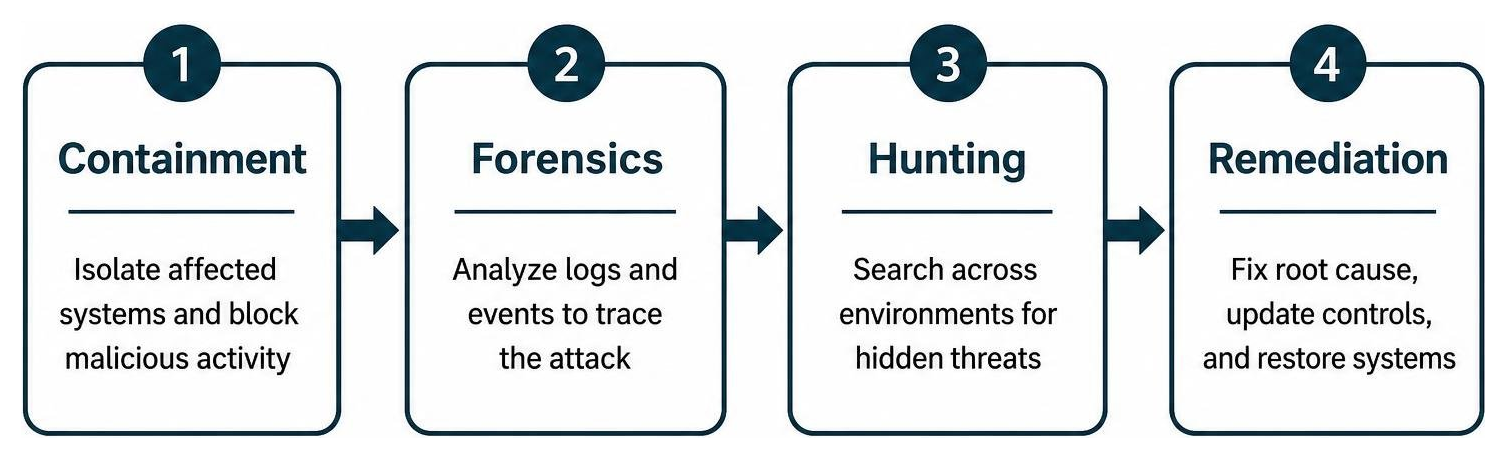
- Automated Containment: Automatically revoking compromised credentials, blocking malicious source IP addresses, and isolating affected virtual servers from the rest of the network to limit blast radius.
- Forensic Logging & Traceability: Reviewing immutable, centralized system logs to track the attacker’s path, entry point, and lateral movements.
- Proactive Threat Hunting: Searching connected cloud environments to ensure no dormant backdoors or secondary payloads were installed.
- Post-Incident Remediation & Root Cause Analysis: Fixing the underlying vulnerability, updating security rules, and restoring system states from clean backups.
Navigating Regulatory Frameworks and Data Privacy
Regulatory frameworks like HIPAA (healthcare), GDPR (data privacy), and PCI-DSS (payment processing) demand strict data handling rules, detailed access tracking, and robust encryption.
When configuring cloud environments, pay close attention to foreign legal jurisdictions. Storing sensitive data with a provider headquartered in a country with weak privacy laws—or one subject to broad government data requests—can expose your records to unintended legal discovery. To mitigate legal and cybersecurity risks, verify that your cloud provider uses strong end-to-end encryption and operates under favorable privacy protections.
Frequently Asked Questions About Cloud Security
What is the shared responsibility model in cloud computing?
The shared responsibility model is a cloud security framework that outlines which security tasks belong to the cloud provider and which belong to the customer. Generally, the provider secures the underlying physical infrastructure, host hardware, facilities, and hypervisor (“Security OF the Cloud”). The customer remains fully responsible for securing their data, application software, guest operating system updates, network access rules, and user identities (“Security IN the Cloud”).
Is a cloud server more secure than an on-premise server?
Neither system is inherently safe or unsafe by default—security depends entirely on configuration and management. However, cloud servers benefit from billions of dollars in physical security investments, continuous hardware maintenance, and automated patch management from global cloud vendors. While on-premise servers grant complete physical control, they rely heavily on the budget, time, and expertise of local IT staff, leaving them vulnerable to physical theft, local site disasters, and unpatched software bugs.
How do misconfigurations compromise cloud servers?
Misconfigurations happen when cloud security settings are left at unsafe defaults, open to the public internet, or configured with overly permissive user access rights. Hackers use automated port scanners and exploit scripts to search the web for unprotected storage buckets, open administrative ports (like SSH or RDP), and default passwords. Once discovered, threat actors can enter the server, steal sensitive business data, install ransomware, or use your computing power to launch secondary attacks.
Securing Your Cloud Environment with Tech Hero
Achieving true cloud server security doesn’t mean you have to slow down your operations or become a full-time cybersecurity researcher. By applying zero trust principles, enforcing least privilege identity controls, encrypting data everywhere, and adopting automated monitoring, you can run your business with total confidence in the cloud.
At Tech Hero, we deliver proactive, flat-rate managed IT and cybersecurity services designed to eliminate your technical worry. Operating from our Orlando, FL headquarters with nationwide reach, our certified experts provide:
- 24/7 Continuous Threat Monitoring: Round-the-clock surveillance across your entire cloud footprint.
- Proactive Cloud Security Posture Management: Catching misconfigurations and configuration drift before attackers do.
- Seamless Migration & Compliance Oversight: Guiding your team through secure migrations while ensuring compliance with HIPAA, GDPR, and industry rules.
- Flat-Rate Managed Support: Clear, predictable pricing backed by dedicated engineers who treat your business like their own.
Ready to find out where your cloud server security stands? Explore our dedicated Tech Hero Cybersecurity Services to lock down your cloud infrastructure today!